Posts

Overhaul of the sky landscapes
Image
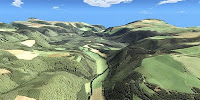
I renewed all landscapes for skyboxes . They are available in six sizes, from 50x50 m for small parcels to 1000x1000 m for island sims. The biggest sizes can be used to split up the sky above an island sim or homestead into additional levels to build on! A menu allows you to do this: Change the surface texture (select one of 30 pre-loaded ones or use you own), its brightness and repeat factor Change the size (each landscape can be rezzed in two sizes) Make the landscape disappear immediately or when you go offline Make the middle of the landscape flat to accomodate your skybox or other buildings On our sim you can see all landscapes, get free demos and the buy the real versions. Below are pictures of all sky landscapes:
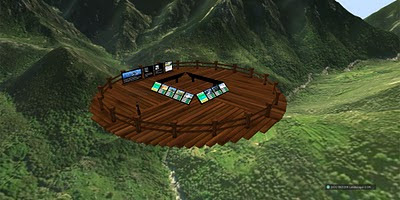
New sky platform layout

Image
This is the new platform where you can see and buy all new sky landscapes . In the middle there are a number of panels. Below each of the pictures of the landscapes there are 9 buttons. When you click/touch the top row the landscape will rez around you. When you use the middle row you can get a demo landscape for free, you can test it on your own parcel/sim, and find out how the menu works. At the bottom row you buy the actual landscape. The buttons have three colors. They correspond to the different sizes of the landscapes, ranging from 50x50 to 1000x1000 meters (a sim is 256x256 m in size). On the platform are some other panels as well. From left to right: get a landmark to the sim surround landscapes, get a notecard with detailed information about the landscapes, get a card with landmarks to other interesting places on our sim, became a member of our subscribe-o-matic update group.

How to change the textures of your sky landscape

Image
This menu pops up when you touch your landscape, and keep your mouse button pressed for at least one second. Click "Texture menu" With the texture menu  you can change the surface textures of the landscape. When you select "Pre-loaded" you can choose a texture category. After that you can choose from several textures. Each landscape comes with more than 30 textures. After you selected a texture, you can change its luminosity (lightness) or the repeat factor (how many times does it get displayed on the landscape). You can also revert to default: the default, dedicated textures will be loaded again. Change the repeat factor... or the luminosity. From the texture menu you can select "User texture". You will be allowed to load a texture into the contents of the landscape. This texture will be applied on the surface. This way you can, for example, use the same texture as your sim ground texture on the landscape....   To do this, you need to edit the landscape (...

Yet another landscape: Winter Mountains

Image
Today I added a scenic winter landscape to the set of surrounds. With this surround you will be able to create a wonderful winter sim. Lift the sim surface up to just above the surround surface (terraforming) and rez your châlets, pine trees and ski lifts there... Your visitors or renters will LOVE it and invite all their friends over! This surround has great potential for winter scenery lovers... The red square in the middle depicts the edges of the sim itself.

New Sim Surround Landscape: Green Hills

Image
Today I added a new surround to the shop. You can place it in a low position to get a set of islands around your sim, and combine it with matching beaches and waves. You can also place it high on your sim, to get a land sim surrounded in a mountain environment. See the pictures below:

New feature: Change the surround textures yourself!

Image
During the last week I have been working on a new feature. From now on you can change the textures of all sim surround landscapes yourself! You can select from more than 30 textures that are already loaded in the surround, or use your own texture. That way you can make the surround match your sim ground. You can too change the brightness of the textures and how often a texture is repeated on the surface. Below are some pictures to give you an idea of what you can do from now on. You can even change the textures of the landscapes that are on display on our sim!

New Tropical Environments

Image
Yesterday I added two new versions of the tropical island surrounds: one with small islands, and one with bigger islands. Both surrounds are made of 26 prims, and consist of vegetated islands, waves and reefs. The prims are joined in one object, which makes it very easy to position the environment. Did you buy a surround with islands earlier? Contact me in-world and you can exchange them for the new version for free!